Administration
Workspace admins configure Opando in Settings. The sections are grouped as they appear in the Settings sidebar.
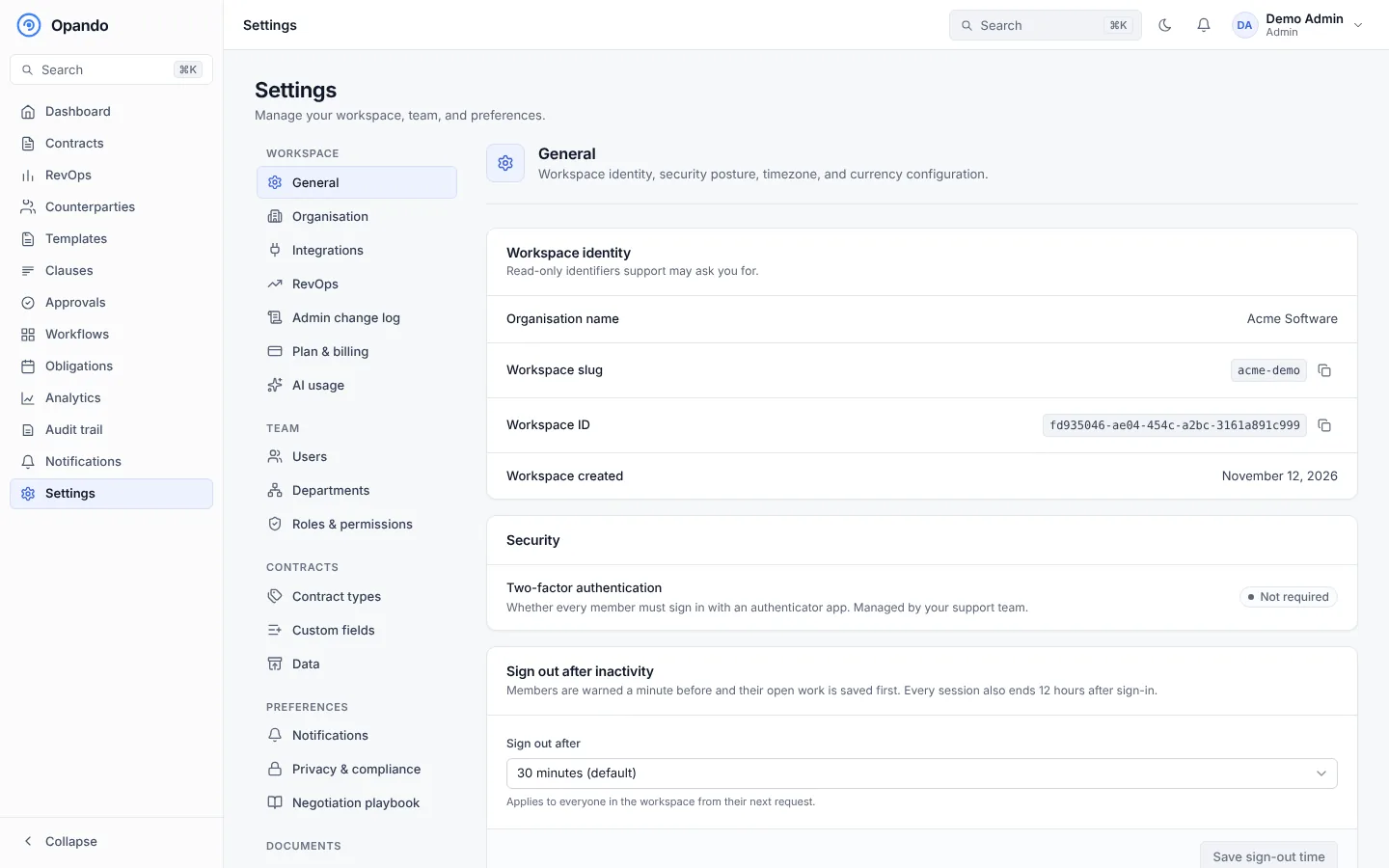
| Group | Sections |
|---|---|
| Workspace | General, Organisation, Integrations, RevOps, Admin change log, Plan & billing, AI usage |
| Team | Users, Departments, Roles & permissions |
| Contracts | Contract types, Custom fields, Data |
| Preferences | Notifications, Privacy & compliance, Negotiation playbook |
| Documents | Header & footer, Branding |
Who sees Settings
Admins see every section their plan includes. Other people only see Settings when their role grants a section, for example Negotiation playbook: view or Branding: manage. A section your plan doesn't include shows what it does and how to upgrade.
On a phone, Settings shows a Settings section picker instead of the sidebar.
Setting up a new workspace
A suggested order for a new workspace:
- General: timezone, currency, two-factor authentication and sign-out time.
- Organisation: legal name and address used on contracts and emails.
- Departments and roles, then invite users.
- Contract types and custom fields.
- Templates and the clause library.
- Workflows for each contract type.
- Notifications, header & footer and branding.
- Bring in existing contracts with Upload a signed contract.